JavaScript Quirks That Will Make You Say “Wait, What?”
Strange-looking JavaScript behaviors explained with simple examples and the rules behind them.

Question - 1
console.log(null === undefined) //false
Why it's false.👀
Expression*:*
null === undefinedResult*:*
false
Explanation
In JavaScript, both null and undefined represent "empty" values but are distinct (different) types.
null is a special object representing the intentional absence of a value, while undefined signifies that a variable has been declared but not assigned a value.
Despite their similar purpose, they are not strictly equal (===) to each other.
null === undefinedevaluates tofalsebecause JavaScript does not perform type coercion with===.
Question - 2
console.log(5 > 3 > 2) //false
Why it's false.👀
Expression*:*
5 > 3 > 2Result*:*
false
Explanation
At first glance, this expression may appear to be checking if 5 is greater than 3 and 3 is greater than 2, but JavaScript evaluates it left-to-right due to its operator precedence.
First,
5 > 3evaluates totrue.Then,
true > 2is evaluated, which in JavaScript results in1 > 2(sincetrueis coerced to1), which evaluates tofalse.
So, 5 > 3 > 2 evaluates to false.
Question - 3
console.log([] === []) //false
Why it's false.👀
Expression*:*
[] === []Result*:*
false
Explanation
In JavaScript, arrays are objects. Even if two arrays have the same content, they are still different objects in memory.
When you compare two
arrayswith===, you are comparing theirreferences, not theircontents.Since
[]and[]are different instances in memory, so the result isfalse.
Question - 4
console.log("10" < "9"); //true
Why it's true.👀
Expression*:*
"10" < "9"Result*:*
true
Explanation
When JavaScript compares strings, it compares their Unicode values lexicographically (character by character).
"10"is compared to"9". Since"1"has a lower Unicode value than"9", JavaScript determines that"10"is less than"9".This comparison might seem
counterintuitive, but it's due to JavaScript'sstringcomparison mechanism.
Question - 5
console.log(NaN === NaN);
Why it's false.👀
Expression*:*
NaN === NaNResult*:*
false
Explanation
In JavaScript, NaN (Not-a-Number)is a special value that represents an invalid number or the result of an operation that cannot produce a valid number.
One of the most unusual aspects of
NaNis that it is not equal toitself. This behavior exists due to the design of theIEEE 754 standard, which JavaScript follows forfloating-point arithmetic.As a result,
NaN === NaNreturnsfalse.
To check if a value is NaN, use Number.isNaN().
Question-6
console.log(true == 1);
Why it's true.👀
Expression: t
rue == 1Result:
true
Explanation
JavaScript uses type coercion with the loose equality operator (==). When comparing true and 1, JavaScript converts true to 1 and then compares the values.
- Since
1 == 1istrue, the overall expression evaluates totrue.
This behavior might lead to unexpected results in some cases, so it’s often recommended to use the strict equality operator (===) to avoid implicit type coercion.
Question-7
console.log(undefined > 0);
Why it's false.👀
Expression:
undefined > 0Result:
false
Explanation
When JavaScript attempts to compare undefined with 0, it converts undefined to NaN (Not-a-Number). Any comparison involving NaN returns false.
undefined > 0becomesNaN > 0, which evaluates tofalse.
Question-8
console.log("5" === 5);
Why it's false.👀
Expression:
"5" === 5Result:
false
Explanation
The strict equality operator (===) checks both value and type. Since "5" is a string and 5 is a number, the types are different, and the comparison returns false.
- If you used the loose equality operator (
==), JavaScript would perform type coercion, converting thestring"5"to thenumber5, and the comparison would returntrue.
Question-9
console.log([1, 2] == [1, 2]);
Why it's false.👀
Expression:
[1, 2] == [1, 2]Result:
false
Explanation
Even though both arrays contain the same elements, JavaScript compares arrays by reference, not by value.
- Since each
arrayis a separateobjectin memory, theirreferencesaredifferent, and thus the comparison returnsfalse.
To check if two arrays are equal, you must compare their contents element by element.
Question-10
console.log(Infinity > 1000);
Why it's true.👀
Expression:
Infinity > 1000Result:
true
Explanation
In JavaScript, Infinity represents an unbounded, positive number. It's greater than any finite number, including 1000.
- Therefore,
Infinity > 1000evaluates totrue.
IEEE Standard 754 floating-points numbers
It's a technical and official standard used by computers to store and do math with real (decimal) numbers.
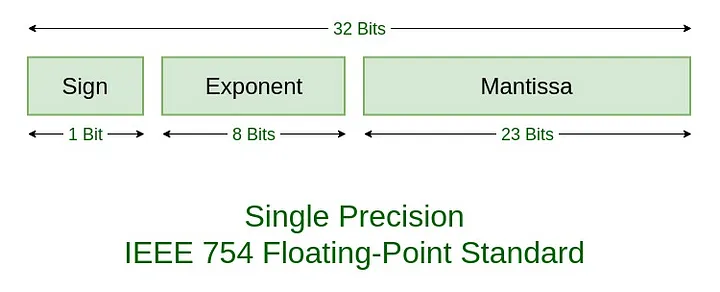
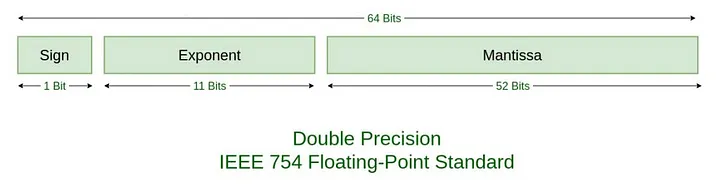
Every IEEE 754 floating-point number splits memory into three parts:
Sign Bit: Tells you if the number is positive (
0) or negative (1). Zero(0)represents a positive number while one(1)represents a negative number.Biased Exponent: Stores the power of two. A fixed bias number is added to the actual exponent so negative and positive powers can both be saved as unsigned bit values.
Normalized Mantissa (Significand): Stores the actual significant digits. Most formats assume an invisible leading
1before the binary point to save space.
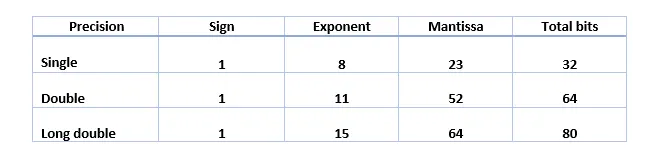
IEEE 754 numbers standard defines several sizes based on the above three components.
Half-Precision, Single precision, Double precision, and Quadruple-Precision.
Single Precision
Double Precision
Half-Precision (16-bit / binary16): 1 sign bit, 5 exponent bits (bias 15), 10 mantissa bits.
Single-Precision (32-bit / binary32): 1 sign bit, 8 exponent bits (bias 127), 23 mantissa bits. Gives about 7 decimal digits of precision.
Double-Precision (64-bit / binary64): 1 sign bit, 11 exponent bits (bias 1023), 52 mantissa bits. Gives about 16 decimal digits of precision.
Quadruple-Precision (128-bit / binary128): 1 sign bit, 15 exponent bits (bias 16383), 112 mantissa bits.
Precision
To demonstrate how this representation works, let us take the value 9.1, a single-precision value. To convert this number to IEEE 754 standard, we have to follow the below steps.
Convert the floating-point
numberintobinary.Write the converted
binaryin scientific format*.*Write the
binary(which is written in scientific format) according to IEEE 754 standard.
A the end,
9.1will be converted to abinarywith a sign bit, exponent, and a mantissa.
1. Convert the floating-point number into binary.
Let us first convert 9.1 into binary. When converting it into binary, we need to identify 9 as an integral part, and 0.1 as the fractional part which should be converted separately.
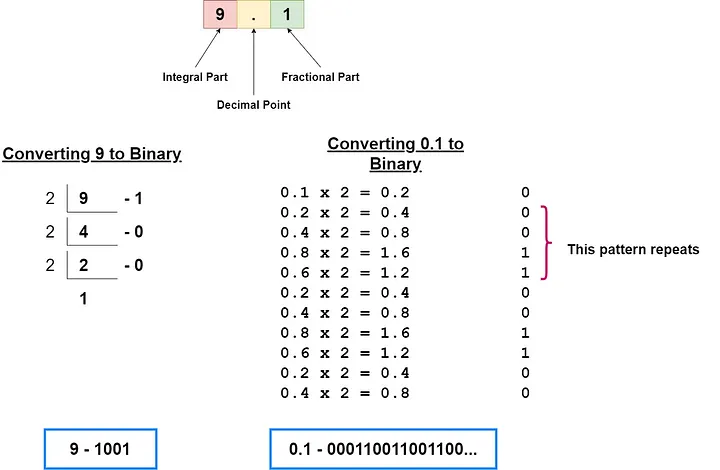
So when converted
9.1to binary we get 1001.000110011001100…
Even though 9.1 is an infinite binary number*, we have only* 23 bits to store it.
2. Write the converted binary in scientific format.
When written 9.1 in scientific notation, the following is the result.
1.001000110011001100... x 2^3
3. Write the binary (which is written in scientific format) according to IEEE 754 standard.
Next, this number should be written in IEEE 754 format.

The first bit in IEEE 754 Floating-point standard is the signed bit.
Special Values
The standard also reserves bit patterns for special conditions:
Infinity (±∞): Results from overflow or dividing a positive number by zero.
NaN (Not a Number): Results from invalid operations like 0/0.
Signed Zeros: Both positive
(+0)and negative(-0)zero exist.Subnormal (De-normalized) Numbers: Tiny numbers close to zero
(0)that lose precision to prevent abrupt underflow.