How DNS Resolution Works
The Journey of a Website to Your Device
When you open any website, you type a name like google.com or amazon.com. These names are used for humans because remembering them is easy. But computers cannot understand these names. They only understand numbers called IP addresses. So, there is a system called DNS that acts as a translator, mapping names to IP addresses and vice versa, so your computer knows which server to connect to.
In this blog, we will understand what DNS is and why name resolution exists, what the dig command is, how DNS resolution happens step by step using root, TLD, and authoritative name servers, and how this connects to real browser requests.
What is DNS, and why does name resolution exist?
DNS (Domain Name System) is like the phonebook of the Internet(typical definition). Humans like to remember names such as google.com, but computers understand numbers such as 199.9.9.0.
DNS converts domain names into IP addresses. When you type a website name in the browser, DNS finds the correct IP address of that website so your computer can connect to the correct server.
Without DNS, we would need to remember IP addresses for every website, which is not practical.
What is the dig command, and when is it used?
dig (Domain Information Groper) is a command-line tool used to query DNS servers and inspect how name resolution works.
dig helps you check how DNS is working behind the scenes.
It is mainly used by developers, system administrators, and network engineers to debug DNS problems, check name servers, and understand how DNS resolution is happening.
Using dig we can see:
Which name servers are involved
Which records are returned
How the DNS query travels step by step
Now, let’s understand how DNS resolution happens in layers.
Understanding dig . NS and root name servers
dig . NS
dig tells about who the name servers are for the root of the DNS system.
The dot (.) represents the root server.
Root name servers are the top-level servers in the DNS hierarchy.
They store only TLDs and do not know the IP addresses of websites.
They only know where to find TLD (Top-Level Domain) servers such as .com, .co, .in, etc.
Root servers are the starting point of every DNS lookup.
Understanding dig com NS and TLD name servers
dig com NS
This command asks the name servers: Who manages the .com domain?
The name server’s response gives the list of TLD name servers responsible for all .com websites.
These servers do not know the IP address of google.com yet.
They only know where the authoritative servers for google.com are located.
So now we move one layer deeper.
Understanding dig google.com NS and authoritative name servers
dig google.com NS
This command asks: Which name servers are responsible for google.com?
The result gives the authoritative name servers for google.com.
These servers are the final authority for google.com.
They store the actual DNS records, such as:
IP addresses
Mail servers
Other DNS information
Now we are very close to the final answer.
Understanding dig google.com and the full DNS resolution flow
dig google.com
This command asks (enquires) directly for the IP address of google.com
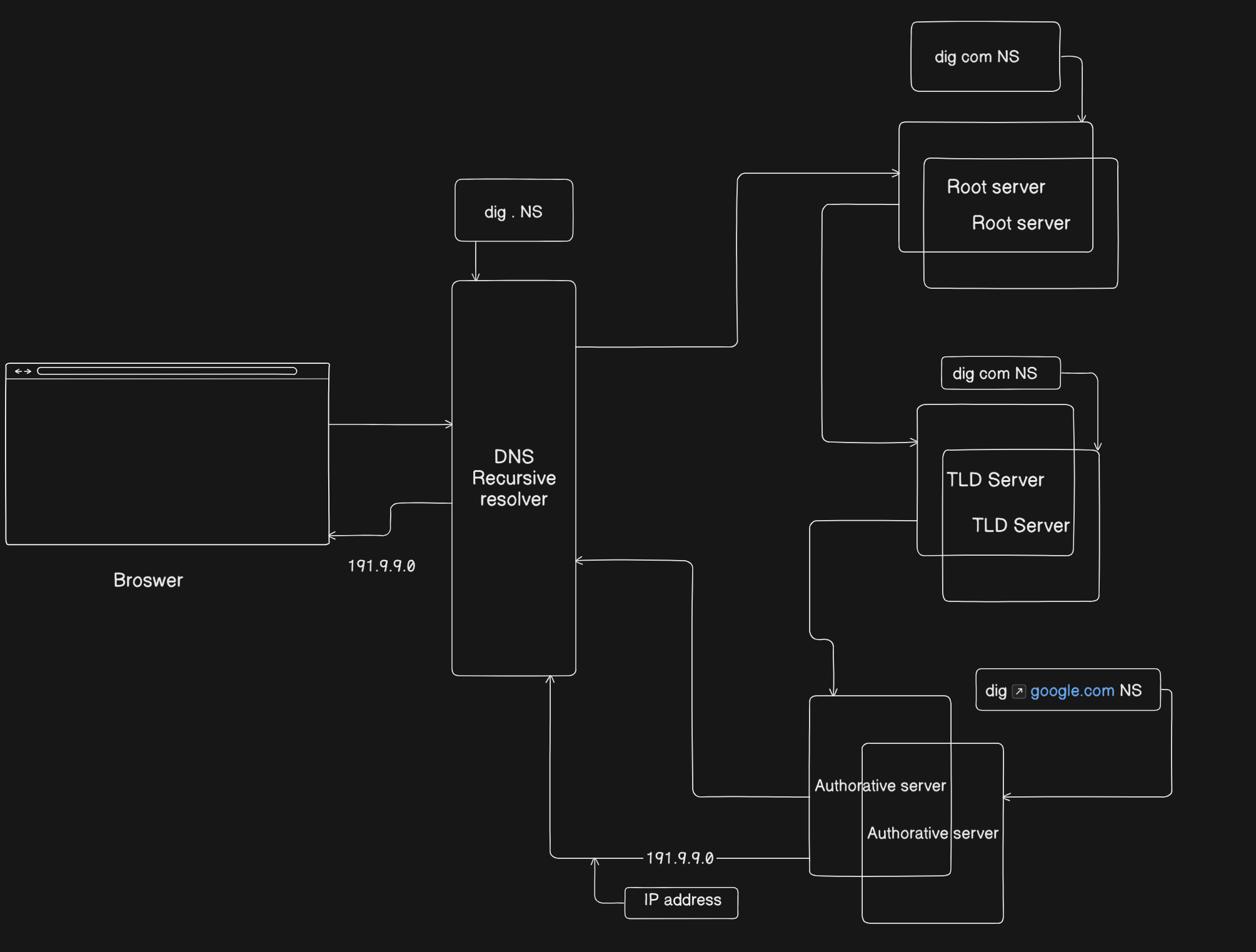
Behind the scenes, the DNS resolver follows this path:
First, it enquires the root server.
Root server replies with TLD servers for .com.Then it enquires a .com TLD server.
TLD server replies with authoritative servers for google.com.Then it enquires an authoritative server for google.com.
Authoritative server replies with the final IP address.
Finally, the DNS resolver returns the IP address to your computer.
Now your browser can connect to the correct web server and load the website.
What NS records represent and why they matter
NS (Name Server) records tell which servers are responsible for a domain.
They define who controls the domain
They guide the resolver to the correct authoritative servers
Without correct NS records, websites will not resolve
How recursive resolvers use this information
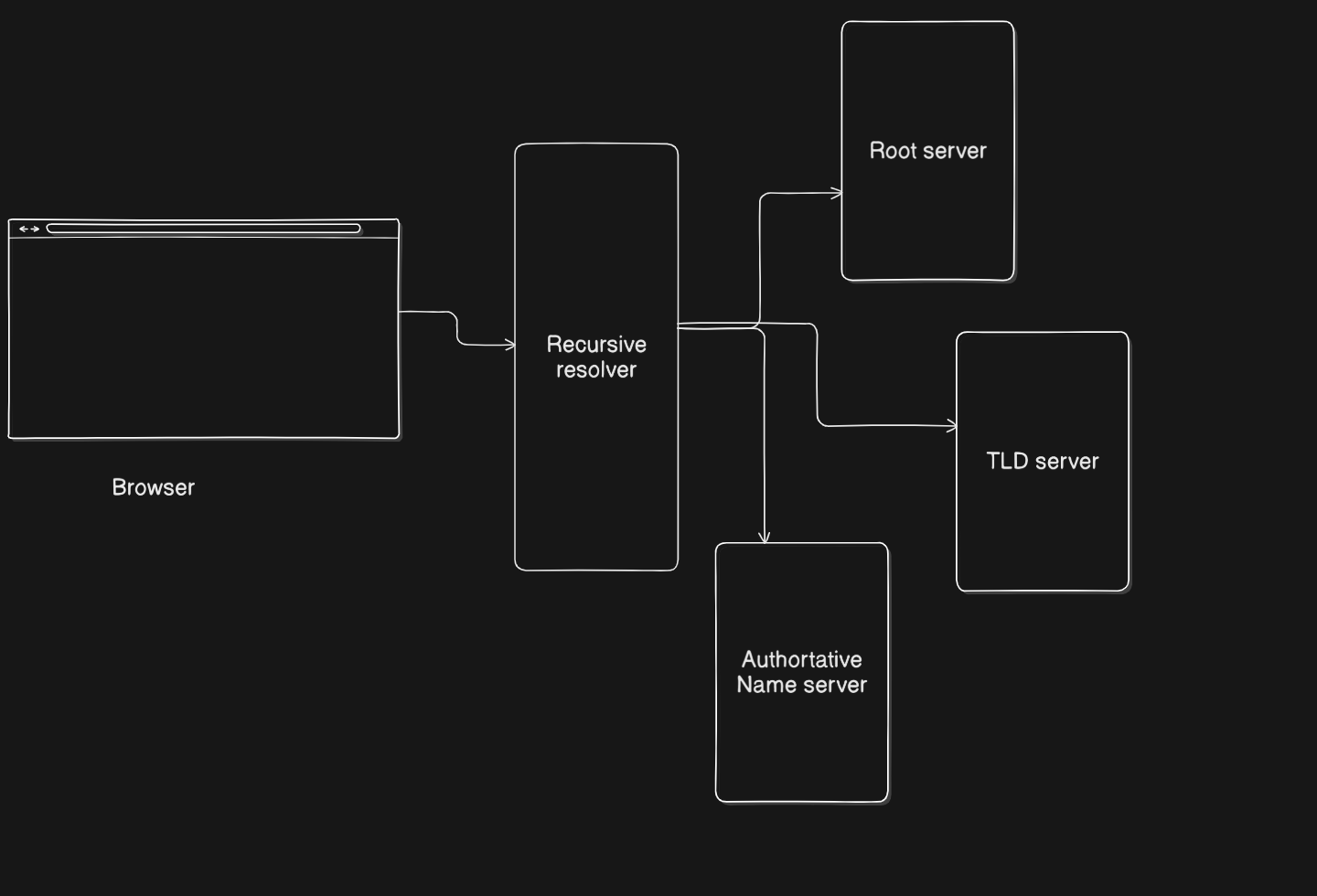
Your computer does not directly talk to root servers.
It sends the query to a recursive resolver (usually provided by your ISP or Google DNS).
The recursive resolver:
Starts from the root servers
Goes to TLD servers
Goes to authoritative servers
Caches the result for future use(reference)
This makes DNS faster and more efficient for repeated requests.
Connecting dig google.com to real browser requests
When you type google.com in browser’s tab, the following DNS process happens.
Browser → Recursive DNS Resolver
DNS Resolver → Root Server → TLD Server → Authoritative Server
Authoritative → IP Address returned
Browser → Connects to server using TCP
Website loads
So every web request depends on DNS before any (communication) data transfer starts.
Conclusion
DNS is the hidden system that makes the Internet usable by converting names into IP addresses and vice versa. The dig command helps us to see how DNS resolution works step by step, from root servers to authoritative servers.
Understanding this flow gives a clear picture of how browsers find the correct servers and how the Internet routes requests correctly whenever you open a website.